Tales of Eternia Remastered Original or Remastered Mode Guide
Discover the differences between Original and Remastered graphics modes in Tales of Eternia Remastered, and choose the best display option for your playthrough.
Published: Tales of Eternia Remastered Wiki Editorial Team
Table of Contents
Understanding Original and Remastered Graphic Modes in Tales of Eternia Remastered
When diving into Tales of Eternia Remastered, one of the most immediate choices you will encounter involves how the game presents its visual and auditory elements. Developed by TOSE CO., LTD., this modern release gives players the freedom to toggle between traditional aesthetics and updated presentation styles. Understanding what each mode entails will help you tailor the experience to your visual preferences, especially when playing across different platforms like Steam, consoles, or handhelds.
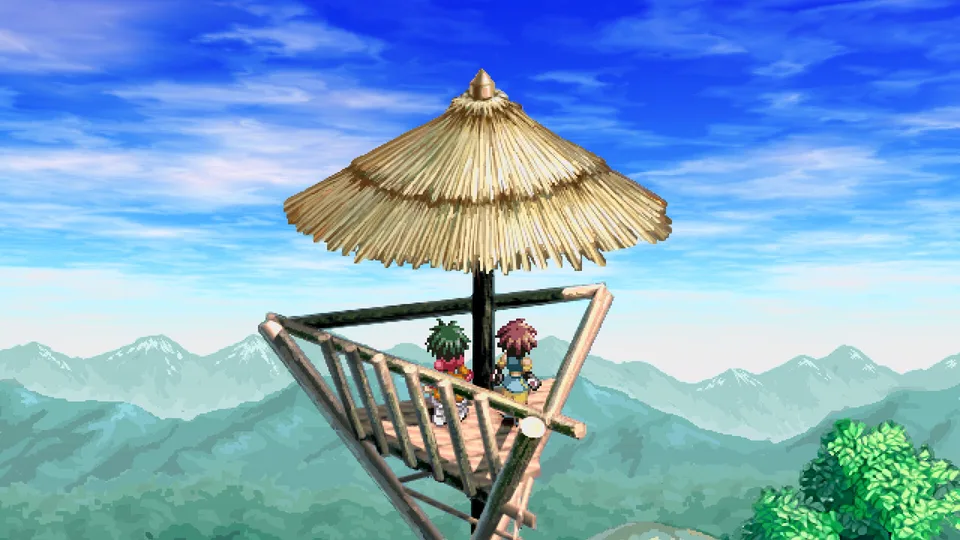
Community reports and early impressions highlight that the choice between the visual settings significantly alters the look and feel of exploration and combat. Because the character sprites maintain a consistent resolution across both options, the primary distinction lies in how backgrounds and environmental assets are rendered.
Original Mode
Preserves the classic pixel art style without smoothing filters. According to community feedback, this mode maintains natural depth, shadows, and environmental details, preventing clashes with the character sprites.
Remastered Mode
Applies upscaling techniques to smooth out pixels across certain parts of the image. While designed to modernize the presentation, player feedback notes it can sometimes flatten backgrounds and reduce shadow depth.
Visual Comparison and Community Impressions
Choosing between the two display styles is largely a matter of personal taste, but examining how they handle environmental assets can guide your decision. In the remastered setting, the game attempts to clean up older assets by blending pixels together. While some players appreciate a softer overall look, many long-time fans and reviewers point out that this smoothing effect can strip away intricate depth and shading found in the original background art.
Furthermore, player experience on various devices—such as the Steam Deck, ROG Ally, and Nintendo Switch systems—shows that pixel scaling can behave differently depending on your display resolution. If you play at higher resolutions like 1440p or 4K, imperfections in pixel stretching can become more pronounced in the updated mode. Sticking with the original visual preset often delivers a cleaner, more cohesive artistic presentation where the pixel sprites and backgrounds complement one another seamlessly.
Audio and Quality-of-Life Integration
Visuals are only part of the equation when customizing your playthrough. Tales of Eternia Remastered also allows you to toggle the game audio and sound effects between the original composition and the updated remastering. This ensures that if you prefer the nostalgic auditory cues of the classic release, you are not forced into using the new audio mix exclusively.
To help you manage your preferences and gameplay flow, the remaster incorporates several modern quality-of-life additions that work independently of your graphic settings:
Toggle freely between original pixel art and remastered visual modes at any time.
Switch between original and updated sound effects or musical arrangements.
Utilize boost features to adjust encounter rates and experience gains according to your preferred pacing style.
Take advantage of auto-save functions, event skipping, and quick party recovery options.
Making Your Choice for the Journey Ahead
Deciding whether to stick with the classic look or try the updated presentation depends entirely on how much you value preserved pixel aesthetics versus smoothed-out UI elements. If you want an authentic visual experience that avoids the flat blending of background details, keeping the game in its original display mode is widely recommended by community reports.
No matter which mode you select, the core adventure featuring Reid, Farah, and Meredy remains anchored by these flexible settings, allowing you to experience the journey across two worlds on your own terms. Be sure to test both modes early in your playthrough to see which aesthetic best suits your screen setup and personal style.